
Wedding Timeline Calculator Tutorial: Free Wedding Day Planning Tool
Master Your Wedding Day Schedule: Complete Guide to Our Free Timeline Calculator
One of the most stressful aspects of wedding planning is figuring out the perfect timeline for your big day. With so many moving parts—ceremony, photos, reception, toasts, dances—creating a realistic schedule can feel overwhelming. That’s why we created our free Wedding Timeline Calculator tool to help you craft the perfect wedding day schedule with ease.
Why You Need a Wedding Day Timeline
Before diving into the how-to, let’s talk about why a carefully planned timeline is essential:
- Keeps everyone on the same page - from vendors to wedding party members
- Prevents scheduling conflicts and ensures adequate time for each activity
- Reduces stress by eliminating guesswork and last-minute decisions
- Helps identify potential issues before they happen
- Creates buffer time for unexpected delays (which almost always happen!)
Professional wedding planners charge hundreds of dollars to create custom timelines—but our free tool gives you the same capability with an intuitive, user-friendly interface.
Getting Started: Accessing the Timeline Calculator
Our Wedding Timeline Calculator is completely free and doesn’t require any signup or registration. Here’s how to access it:
- Visit our Wedding Tools page
- Click on the “Create Timeline” button under the Wedding Timeline Calculator card
- You’ll be taken directly to the interactive timeline builder
The calculator works on any device—desktop, tablet, or mobile—so you can plan your timeline wherever you are, whether you’re meeting with vendors or brainstorming with your partner.
Creating Your Basic Timeline Structure
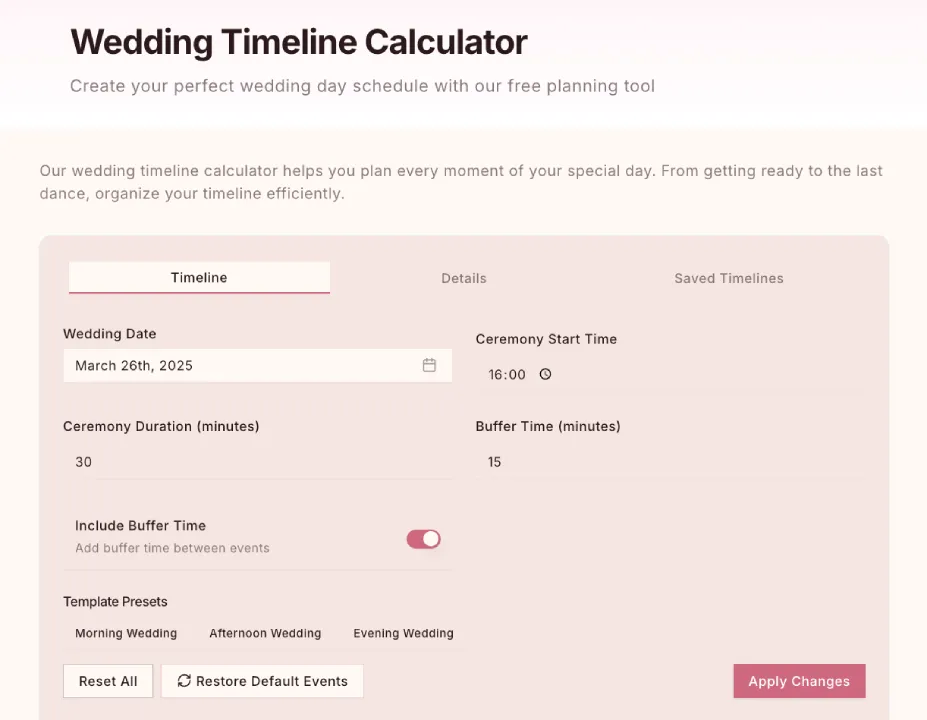
The first step is setting up the foundation of your wedding day:
Step 1: Choose Your Wedding Type
Our calculator offers preset templates for:
- Morning wedding with brunch reception
- Afternoon ceremony with evening reception
- Evening ceremony with nighttime celebration
Select the option that best matches your plans to start with an appropriate template.
Step 2: Set Your Key Times
Input your essential timepoints:
- Ceremony start time
- Ceremony duration
The calculator uses these anchor points to help structure everything else in your timeline.
Step 3: Include Buffer Time
Add buffer time to account for:
- Unexpected delays
- Guest transitions between activities
- Setup and breakdown time for vendors
Simply set how long your buffer periods should last and apply the changes to create a more realistic schedule.
Adding and Customizing Timeline Events
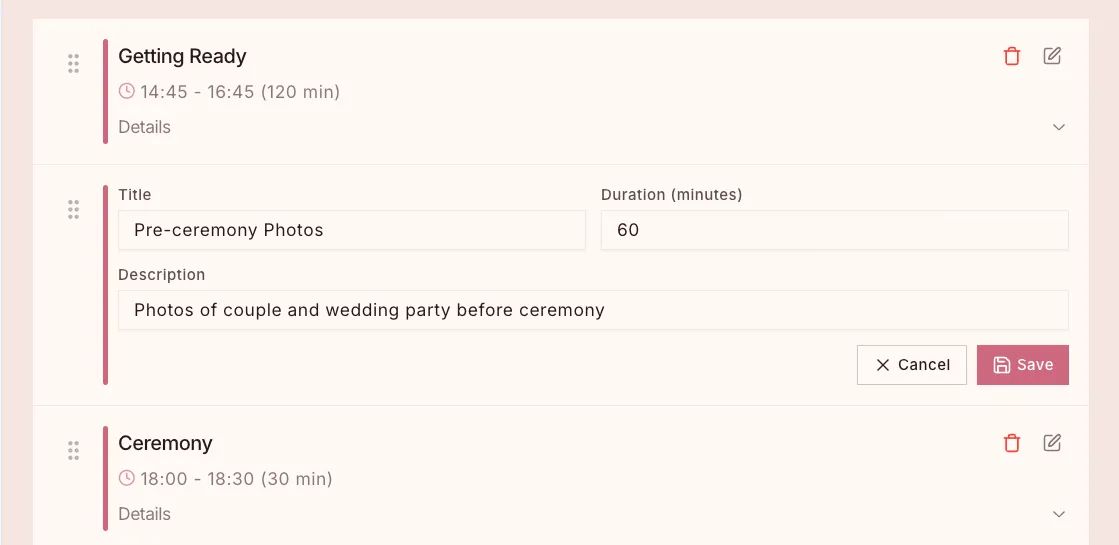
Now it’s time to fill in the details of your day:
Pre-Ceremony Activities
Our tool automatically includes essential preparation activities like:
- Hair and makeup
- Getting dressed
- First look (if selected)
- Wedding party photos
- Family photos
You can customize the duration of each based on your specific needs.
Ceremony Details
Fine-tune your ceremony timeline:
- Guest arrival buffer (usually 30 minutes)
- Ceremony duration
- Post-ceremony activities (receiving line, travel time)
Reception Schedule
The reception often has the most moving parts:
- Cocktail hour
- Grand entrance
- First dance
- Toasts and speeches
- Dinner service
- Cake cutting
- Parent dances
- Open dancing
- Send-off
For each activity, you can adjust the timing, duration, and add notes for vendors or wedding party members.
Drag-and-Drop Functionality
One of the coolest features of our timeline calculator is the ability to easily rearrange events:
- Click and drag events to new times or positions
- Instantly see how changes affect the rest of your schedule
- Experiment with different event orders without starting over
- Fine-tune your timeline with simple visual adjustments
This intuitive interface makes it easy to perfect your schedule without frustration.
Using Advanced Features for Perfect Planning
Our timeline calculator includes several powerful features that make it truly useful:
Adding Custom Events
Have unique elements planned for your wedding? Add custom events like:
- Cultural ceremonies or traditions
- Special performances
- Outfit changes
- Surprise moments for your partner or guests
Creating Buffer Time
Professional planners always include buffer time. Our tool allows you to:
- Add intentional buffer periods between activities
- Highlight flexible vs. fixed time points
- Create realistic transitions between events
Vendor Coordination Notes
For each timeline item, add specific notes for:
- Which vendors need to be present
- Equipment or setup requirements
- Special instructions or contingency plans
Sharing Your Timeline with Others
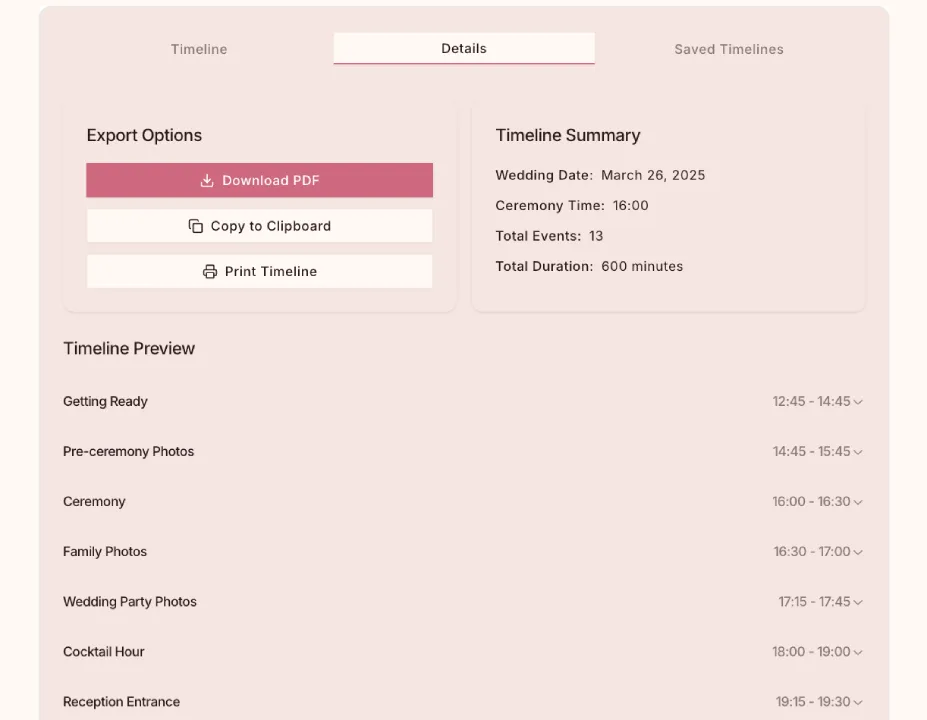
Once you’ve created the perfect timeline, sharing it with your wedding team is crucial:
Sharing Options
Our tool lets you:
- Export to PDF for easy printing or emailing
- Copy timeline details to paste into emails or messages
- Print physical copies for in-person vendor meetings
Creating Vendor-Specific Timelines
Different vendors need different information:
- Create photographer-specific timelines highlighting photo opportunities
- Generate catering timelines focused on meal service and cake cutting
- Develop coordinator timelines with all details for comprehensive oversight
Saving and Revising Your Timeline
Wedding plans evolve, and our tool grows with you:
Saving Multiple Versions
Keep track of your planning process by:
- Saving draft timelines as you work
- Creating “Plan B” timelines for weather contingencies
- Developing different scenarios to compare options
Revision History
As your wedding day approaches and details change:
- Update your timeline easily
- Track changes you’ve made
- Revert to previous versions if needed
Day-Of Timeline Management
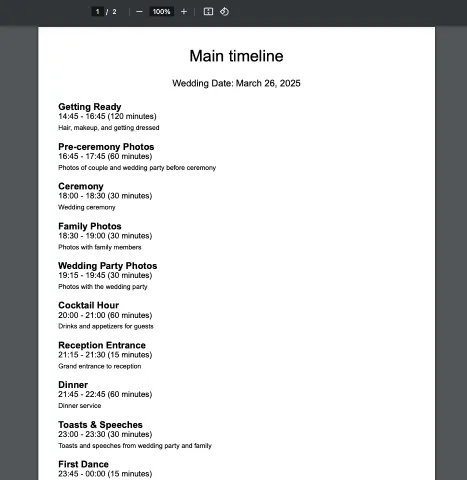
For the big day itself:
Printed Timelines
We recommend:
- Creating condensed printed timelines for key people
- Using different formats for different groups (detailed for vendors, simplified for family)
- Including contact information for all vendors
Delegating Timeline Management
The couple should not be checking the time on their wedding day! Assign timeline management to:
- Wedding coordinator
- Best man/maid of honor
- Designated family member with good organizational skills
Common Timeline Mistakes to Avoid
Based on feedback from hundreds of couples, here are the most common timeline pitfalls:
- Not allowing enough time for photos (always add 15-30 minutes more than you think)
- Forgetting travel time between venues
- Scheduling too tightly with no buffer for delays
- Neglecting to account for guest experience during waiting periods
- Underestimating setup and breakdown time for vendors
Our calculator helps you avoid these issues with smart defaults and helpful reminders.
Integrating Your Timeline with Our Photo Collection Service
For a truly comprehensive wedding plan, pair your timeline with our photo collection service:
- Schedule specific times for guest photo opportunities
- Plan when to display your photo collection QR code
- Coordinate with your photographer to ensure professional and guest photos complement each other
- Create post-wedding photo sharing timelines
Learn about our wedding photo sharing packages on our homepage.
Final Timeline Checklist
One week before your wedding:
- Review your timeline one final time
- Share the latest version with all vendors and confirm receipt
- Brief your wedding party on key times and responsibilities
- Create a condensed version for personal reference
- Then, let go and enjoy your day!
Remember, your timeline is a guideline, not a rigid schedule. The goal is to create structure that reduces stress, not adds to it.
Start Planning Your Perfect Wedding Day
Your wedding day will be one of the most memorable days of your life. Our free Wedding Timeline Calculator helps ensure it runs smoothly, allowing you to be fully present for every special moment.